Airtel 3G latest hack for March April

Get every trick latest in advance by becoming a member of my blog.

Yes, you can be someone special,who get all ticks before audience, what you need to do is to follow some simple steps and terms and conditions, Click here to know more. Hurry, once all the state members are completed, this post will automatically be titled as Expired or Done. Last date will be posted before 30th May 2013
Naveen jain

Friday, 28 April 2017

7 coolest Firefox Tricks

Posted by Unknown on 13:16 with No comments
Firefox is designed to provide you improved browsing experience. It is equipped with numerous useful features and functions. Despite the fact, Firefox is a leading browser amongst users still there are many useful features which are left unnoticed by many users. Let’s discuss these hidden features of Firefox in these tips and tricks.
Remove items from address bar history: Firefox’s built-in feature enables you to see the previous visited URLs in address bar drop-down when you begin typing the URL. It displays the URLs matching to the letters you are typing. It helps you quickly access those websites and URLs. For any reasons, if you don’t like this feature or want to erase previously visited URLs history then you can remove them from the drop-down list. To do this, start typing URL in the address bar when suggested URLs are displayed go to the one which you don’t want to display, using down arrow and press delete. It will instantly disappear that URL from the list.
Mouse shortcuts: Applying shortcuts while working on the system is extremely useful and makes your work smooth and faster. Similar to keyboard shortcuts there are plenty useful Mouse shortcuts as well, which helps you save your time and efforts. These shortcuts are useful to perform numerous useful functions. Let’s discuss some of these useful shortcuts here.
  • Middle click on link (opens in new tab)
  • Shift + Scroll up (next page)
  • Shift + Scroll down (previous page)
  • Ctrl + Scroll up (decrease text size)
  • Ctrl + Scroll down (increase text size)
  • Middle click on a tab (close tab)
Limit RAM Usage: This one is a useful trick when you want Firefox to use fewer resources while performing normally. Limiting RAM usage can help you speed up your system performance. If you find Firefox is consuming too much memory than required or you want to limit is usually, you can make some certain changes in its settings. To do this, go to about:config, filter “browser.cache” and select “browser.cache.disk.capacity”. By default, you find it at 50000 value, but you can lower this value depending on how much memory you have on your system. Try to fix it at 15000 if you have RAM between 512 MB and 1 GB.
Source: proxyswitcher
Move or remove the close tab button: If you have accidentally click on the close button of Firefox tabs, you can move or remove them using about:config in address bar. Now edit the preferences for “browser.tabs.closeButtons”. Set value from 0-3. Here is the meaning of each value.
  • 0 – Display a close button on the active tab only.
  • 1 (default) – Display close button on all tabs
  • 2 – Don’t display any close buttons
  • 3 – Display a single close button at the end of the tab bar.
Source: jeffersonscher
Pin the tab on the homepage: You can find all your recently visited websites as a thumbnail grid on the Firefox homepage. You can customize these thumbnail settings as per you want and can pin any of your favorite tabs on the home page. To do this, type about:config in address bar. It will open the settings. (Here you will find the default arrangement for the thumbnails at 4x3 grid) Now select browser.newtabpage.rows and browser.newtabpage.columns, double click and make the required changes. The changes will take effect instantly.
Source: thewindowsclub
Shrink your icons: This useful tip helps you achieve a more minimalistic look of Firefox browser screen. You can make your browser icons small to make use of more screen space easily. To do this, simply go to View > toolbars > Customize and then choose the box name Use Small Icons.
Search inside any website: Use this nifty trick to search inside any website. To do this, you can create a search keyword to get improved search results within a website. You can apply this change with a simple tweak in Firefox browser. To do this, open any website in the Firefox browser, right-click on the search box and select “Add a keyword for this search” option. It will open a new pop-up window to create a particular keyword for your search. Once added to the list, you can use this search keyword for direct and instant search on your address bar.

You can follow these simple yet useful tips of Firefox to improve the browsing experience. Apart from these useful tips, you can look for many other interesting tips & tricks to improve Firefox experience.


About Author :- Yogesh Sharma is working as an SEO personnel and technical content writer for Systweak. He likes to talk about various threats to cybersecurity and cybercrime awareness in his blogs. 

Read Here: http://blogs.systweak.com/

Friday, 27 January 2017


The payment gateway authenticates transactions by acting as an interface between shoppers’ financial institutions and merchants’ bank accounts. As a software application, it does this by conducting secure transactions and verifying user identification, among other functions. It tells the financial institution behind the customer’s card whether to send money to the merchant or not, depending on the authenticity of the transaction. This application is essential for any transfer of money from customer to merchant on the Internet.
Payment gateways provide additional layers of security in the authentication process, such as complex algorithms to detect fraud, and they employ sophisticated encryption protocols in order to protect data when a transaction is going through. The overall security of a payment gateway is very important if you want to protect yourself and your customers from fraudulent transactions. With those goals in mind, let’s take a look at the factors that make a payment gateway system secure.   
Security Indicators
There are several features in a payment gateway application that indicate security levels that are satisfactory. The first thing to look at is data encryption. A payment gateway handles very sensitive financial information, and if security is weak, any hacker can peer into the gateway and make off with your customers’ financial information. Look for VeriSign SSL certificates, which indicate a standard form of encryption security that can be trusted. CVV2 verification is another layer of security to look out for, which ensures that the customer is paying with their own authentic card.
Next, you should consider your payment gateway’s PCI level. According to the PCI Standards Council, the Payment Card Industry Data Security Standard (PCI DSS) was developed in order to increase controls around cardholder data, so as to reduce credit card fraud. PCI Level 1 is the strictest standard in this respect, so a payment gateway with this standard is extra secure. Check for token technology as well, as this provides an extra level of security on top of everything else.
Customer data should be kept from your servers, and it should be nearly impossible for cyber criminals to get their hands on this data.
                                      
Common Anti-Fraud Tools
Your payment gateway should have robust and up-to-date anti-fraud tools, including geolocation, blacklist and OFAC list lookups, delivery address verification, identity morphing detection, AVS checks, and velocity pattern analysis. Your gateway doesn’t necessarily have to feature every single measure on the market, but the more layers of redundant protection, the better.
Think of it as casting a wide net. As CBS and other news outlets and security agencies have reported, cybercrime is at an all-time high. Cyber criminals have gotten very creative with their methods, and that includes methods of credit card fraud. The more anti-fraud measures your payment gateway system has in place, the less likely you are to get hit with fraud.
Active Chargeback Management
Chargebacks happen when fraudulent activity has been detected. When a customer calls up their bank and disputes a charge, the bank will take back money transferred to the merchant if fraudulent activity is detected. A good payment gateway should have some sort of chargeback management built in, which can protect you from unfair chargebacks.
Benefits of Tight Security
The benefits of a secure payment gateway increase exponentially over time, so it is worth investing more resources up front for a high-quality service. It is one thing to be protected from instances of fraud, unfair chargeback, and information theft. It is another thing entirely to have to rebuild your reputation as a trustworthy and secure merchant.
Network effects will increase your new customers, and you will keep plenty of loyal customers as well. To accommodate growth, Secure payment gateways not only protect you from loss, they actively help you build cred in your given market and ultimately increase your revenue. With the rise of cybercrime, it definitely pays to invest in a comprehensive and secure payment gateway service. Now that you know what standards to uphold, you shouldn’t have any problems finding the right one.


Author Bio (Guest Post): Arthur Jones is an experienced freelance writer with a background in eCommerce and merchant services technologies. He has worked with payment gateway technologies in particular, and he loves to share his knowledge and experience with interested readers.


Images:


Sunday, 16 March 2014

Hello everyone out there, and Happy Holi this is naveen jain, and today i am going to make a openvpn config file which will inturn make the unlimited. if you know previous pdproxy which is also shared for march april 2014, then this will work fine, and if previous does not work, then follow the steps carefully, i will tell you step by step. Please don't be so forward, and if you are new to openvpn, just drop me a mail on nveenjain@gmail.com. I will try to help you. But this article is self explainatory, specially for newbies.
So first see the features of this trick.

Features:-

  • TCP supported:- This trick is tcp supported, so no issues, and will work in those states where tcp port is opened.
  • High Speed 3G:- This trick will give you high speed 3G. Use it in Limit. (100Mb and then disconnect otherwise your sim may get blocked.)
  • Torrent Supported:- This trick will be appreciated by torrent lovers, as it supports torrent.
  • Need to change Password:- You need to change password, every 7 days, don't worry, it's very easy. I will explain it in this tutorial.
  • Exclusively on BestComputertutorials.blogspot.com:- This trick is exclusively distributed on bestcomputertutorials.blogspot.com
  • Easy To use:- This trick is easy to use.

Steps:-

  • First Download and install NMDVPN, if you don't know where to get it, then get it from here.
  • Also install tap drivers which are included in NMDVPN itself, now download the config files and extract them and paste them in C:\Program Files\NMDVPN\config folder.
  • Now open NMDVPN with administrative privilages and then connect to airtel through APN- airtelgprs.com.


  • In tray, on the right hand side you will see NMDVPN, Right click it and connect to any of our servers.
  • It will get connected. and enjoy free internet.

Changing Password:-


  • This trick requires to change password as password is changed by site every 7 days, so follow the steps to change password, Go to vpnbook.com, then Scroll down, and clck on PPTP or OpenVPN, then you will get password. This is working password, copy it.


  • Go to C:\Program Files\NMDVPN\config Folder, now open password.txt and remain first line(which is username) as it is that is vpnbook, and change the second line(which is password) to the new password. And save the file and then connect again.


Enjoy the holi gift, and remember, disconnect after 150 MB and then connect again otherwise your sim may get blocked.

Monday, 10 March 2014

Hello guyz, i am back after a long time, but understand that i am not able to fetch tricks, as i am in kota, but this one is only for you all.
So Let's see features of the trick. Please follow http://bestcomputertutorials.blogspot.com

Features:-

1. Tcp :- Most of india have airtel Tcp enabled, so will work there.
2. Pd-proxy:- Works with pd-proxy, use it and have fun, easy to use.
3. No configuration files to download.
4. High speed 3g: You get high speed 3G for free
5. Torrent through zbigz:- Torrent can be used though zbigz.
6. 100MB limit per day:- Pd proxy have 100MB limit daily, but you can insert pen drive with pdproxy in it, follow the steps and after 100MB format pen drive and then again insert pd proxy in it. Enjoy it unlimited. or wait for a day, we are going to make it unlimited.
Process:-
1.)Download pd-proxy, and register there.
2.)Open pd-proxy
3.)Go to settings
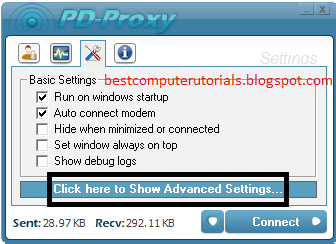
4.)Click on Click here to show Advanced Settings

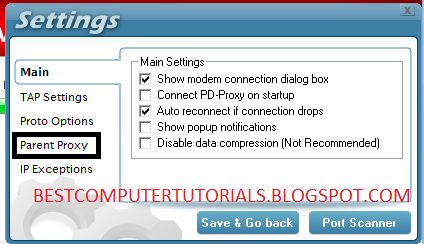
5.)Click Parent Proxy

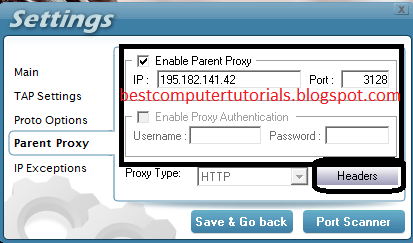
6.)Check Enable Parent Proxy and enter the following proxy:
Proxy :- 195.182.141.42           Port:3128


7.)Click on headers, and enter the following command and click Save
Host:airtellive.com/        X-Online-Host:airtellive.com/

8.)Now Save that and enter your username and password, and then connect to airtel with APN= airtelgprs.com and then click on connect in Pd-Proxy.


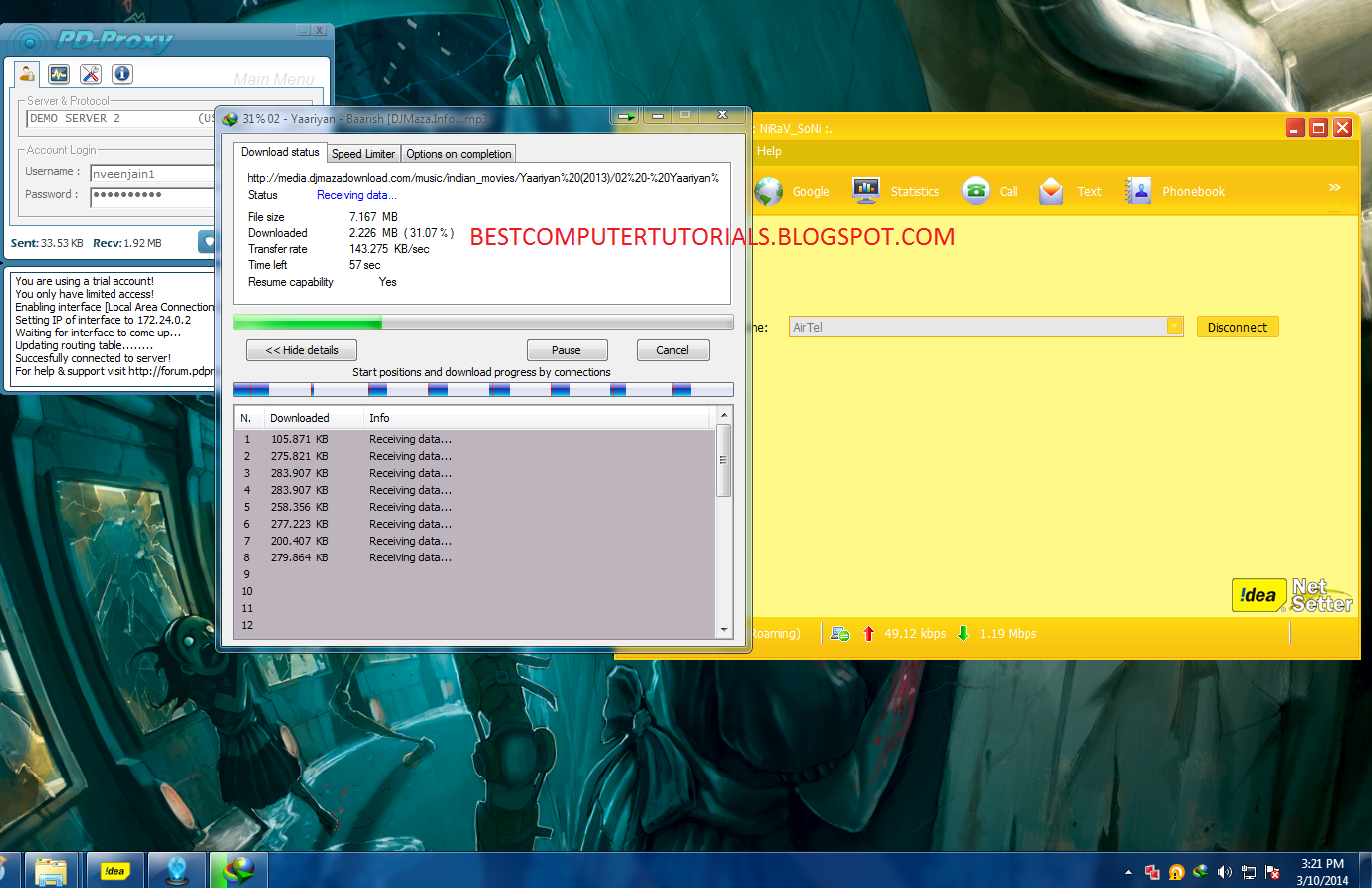
Browse free and enjoy, please comment if works, and if not works, then tell me your state. and paste the log in comment.

Screenshot:-

Sunday, 19 January 2014

Hipfiles Premium account

Posted by Unknown on 18:04 with No comments
I am back again with a new premium account, well i am late because i am preparing for iit, and during these months i was offline completely, but now today i am writing the post and maybe after a few weeks, i write another cool posts but please keep patience till then, i am going to tell you a premium account of hipfiles.com which is a site that allows downloading, and it's premium is of course requested and therefore i am sharing it, i am using it since last 5 days and its working very fine.
So lets start the trick:-

Requirements:-


  • A internet connection
  • A downloading link

Steps

  • Use the following details after opening hipfile.com. Now use the following details:-
Hipfile Premium account
UsernamePassword
premiumi611premiumi611.ir

Proof:-


Wipfiles Premium account

Posted by Unknown on 17:35 with No comments
I am back again with a new premium account, well i am late because i am preparing for iit, and during these months i was offline completely, but now today i am writing the post and maybe after a few weeks, i write another cool posts but please keep patience till then, i am going to tell you a premium account of wipfiles.net which is a site that allows downloading, and it's premium is of course requested and therefore i am sharing it, i am using it since last 5 days and its working very fine.
So lets start the trick:-

Requirements:-


  • A internet connection
  • A downloading link

Steps

  • Use the following details after opening wipfiles.net.Now use the following details:-
Letitbit Premium account
UsernamePassword
escalon123174

Proof:-


Letitbit Premium account

Posted by Unknown on 16:36 with No comments
I am back again with a new premium account, well i am late because i am preparing for iit, and during these months i was offline completely, but now today i am writing the post and maybe after a few weeks, i write another cool posts but please keep patience till then, i am going to tell you a premium account of letitbit.net which is a site that allows downloading, and it's premium is of course requested and therefore i am sharing it, i am using it since last 5 days and its working very fine.
So lets start the trick:-

Requirements:-


  • A internet connection
  • A downloading link

Steps

  • Use the following details after opening letitbit.net.Now use the following details:-
Letitbit Premium account
UsernamePassword
taicuongngo1210@gmail.comtaicuong1210

Proof:-